CSS is the thing that makes websites beautiful, without CSS everything would look sad and unattractive. This is why I have collected Powerful and Userful CSS Tools to reduce your work time.
As you knew in the earlier topic, that problem occur when I make too many items list. Now you will be read the part 2 of full article about CSS Tools.
CSS and Form
- JotForm is a great Web based WYSIWYG form builder. You can select a form type(Contact Us, Satisfaction Survey, Job Application, Suggest Website , Membership Registration, Party RSVP , Wedding Attendance, Reservation, Submit Product, and others). Your new form will be created with the default fields on the selected form.
- CSS Form Builder – CSS Form Builder automatically generates forms that are compliant with accessibility standards. Combine that with the power and control that you get from using CSS and your web form creation just got a lot easier!
- CSS Form Code Maker – Generates ‘Colorful Box Layout’ For Forms. This HTML – CSS form generator will create a nice looking layout for forms. The time is now right – to move to ‘tableless’ layout for forms. And at the same time, add a ‘little color’ to the forms.
- Wufoo– Wufoo is an online HTML form builder that helps you create contact forms, web surveys and invitations so you can collect information, registrations and payments without writing a single line of code.
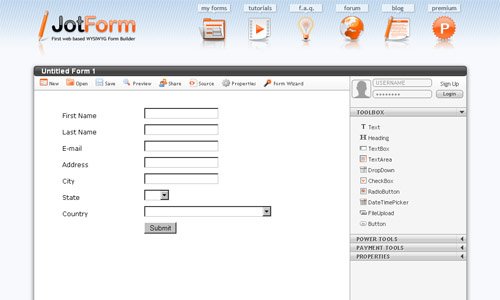
JotForm - FormLogix is an online form builder tool for creating web databases and web forms. The forms may be embedded in your website, blog, or may be used internally. Forget all you know about databases and forms creation – form builder is a WYSIWYG tool and it requires zero coding skills. It enables a user to easily create web forms and web databases such as: Contact us forms, Feedback forms, Events registration forms, Surveys, online Polls, Order forms, Invitations, CRM…
I’m not add more Form Generator Services cause it can make JS and CSS to generator a form, it will be mentioned in an article in time to come.
CSS and Navigation
- CSS Menu Generator – will generate both the CSS and the HTML code required to produce a text-based yet appealing set of navigation buttons. As text links are fast becoming preferred over images where search engine optimization is needed, a CSS menu can give the affectiveness of text links with a better look than standard text links. For an example of a CSS menu, look at our navigation on the left.
- List-O-Rama will allow you to generate nice CSS inline menus in seconds. Just walk through the wizard and insert the text of the links, choose the vertical or horizontal menu, pick the design and click on finish. The code is automatically generated and inserted in your page. It can’t get any easier than this.
- CSS Menu Builder With 30+ horizontal menus, 700+ vertical menus combinations and breadcrumb menus that consist of more than 200+ combinations, in total the site offers more than 1000 menu combinations not including the endless color combinations.
-
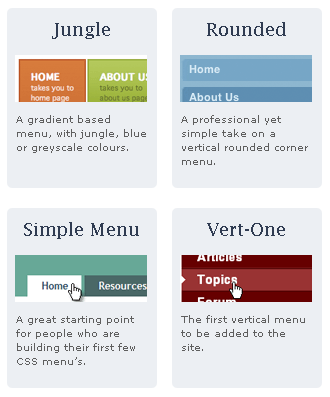
13Styles – CSS Menus 13 Styles – CSS Menu Generator – The menus are list based, very light-weight, easy to implement, and cross-browser compliant. All the menus are free, though you can purchase the original PSD images to customize certain menus for $24.99.
- CSSMenuMaker.com is here to provide the average webmaster with tools to create custom, cross browser compatible website menus. Our menu generator makes it easy to create custom CSS menus without having to know all the complicated HTML and CSS. If you are a more experienced web developer we provide the sources code for all our CSS menus so that you can download, tweak, and integrate as much as you want. Feel free to use our CSS menu generator an unlimited amount of times. The only thing that we ask is if you find this site useful, help us spread the word by linking to us or bookmarking us with digg.com or del.icio.us.
- Listamatic and Listamatic 2 – Can you take a simple list and use CSS to create radically different list options? The Listamatic shows the power of CSS when applied to a simple list.
- MyCSSMenu provides the average webmaster with tools to create custom, cross browser compatible css menu. Our generator makes it easy to create custom web navigation: Horizontal, Vertical, Drop-down menu without having to know all the complicated HTML and CSS. If you are a more experienced web developer we provide the sources code for all our CSS menus so that you can download, tweak, and integrate as much as you want. Feel free to use our CSS menu generator an unlimited amount of times.
So you’ve finished reading section 2 of the article, the next section will talk about the CSS Frameworks and optimization tools, and CSS compressors.