
Have you ever visit Apple’s MobileMe website? The login screen has form labels that are written within the value of their associated input field.
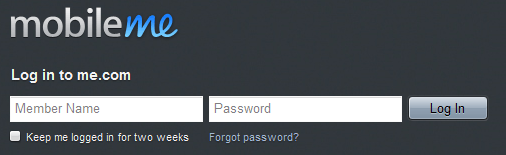
Inline labels are nothing new – in fact the easiest way to label a field is to simply set the field value up front and blow it away when the field gains focus. This is handy way for designers to save space and make their designs cleaner all-around. Unfortunately for us developers, simply setting the input value isn’t very semantic or usable then you can’t do it simple. I’ve just use a little jQuery to make it all happen.
The HTML
We’ll start with the HTML. Nothing fancy here, just your standard sign-up form with labels and inputs.
[gist id=2886213]
And a Little Bit of Javascript
The JavaScript needs to do three things:
- Add the focus class to the label when the user clicks into a field and move the mouse cursor to start position
- Add the typing class as soon as they start typing to make the difference
- Bring the label back if they leave the field empty and switch to another field.
I’ve found a small jQuery snippet allow me choose the mouse cursor position when I click on input field.
[gist id=2886218]
First of all, I will want to loop through our label elements and assign their values to the inputs that immediately follow. Then you’ll want to hide those labels.
[gist id=2886229]
Next step, I will handle the CSS classes to get rid of the label values at focus and blur events.
[gist id=2886236]
Finally, I have complete jQuery snippet:
[gist id=2886259]
Styling the form with CSS
The CSS isn’t important at all to what we’re trying to do, so I won’t cover any of that. There are a few key CSS lines that give us the positioning and effects we want.
[gist id=2886270]
Inline Form Labels with JQuery (View in Action)
Conclusion
It’s so simple, but perfect that solves an obnoxious little usability problem for inline labels.
Smashing Magazine recently published an article by Zurb called Stronger, Better, Faster Design with CSS3 that expands on this technique and makes it even better with CSS3 by just masking the label so even when you click into the input you can still read the label.
You can use a simple jQuery plugin to get the same result, its call In-Field Labels jQuery Plugin


Hi
This is great however how do you prevent the label from being mistaken as the value? I have been spending quite some time lately trying to resolve this ongoing problem…
Kindest Regards
Rachel
You can change value and label as you want, I’m not test it but I guess it worked.
I’ve been using this on a few sites and it’s great! Do you have any suggestions for how to use this on a password field? Ideally it would be regular text that says something like “Enter Your Password” and then change to a password field on click so the actual password is obstructed. Hopefully that makes sense.
thanks again,
Jonathan
I will write a post about it. This time is our tradition holiday, so may be that post will public on February 15! Hope you come back or subscribe my RSS Feed: http://feeds.feedburner.com/Narga 🙂
Thanks, Narga, I’ll keep on the look out. Have a great holiday!
This line causes a problem with ASP RequiredFieldValidators as they write a element inside the label tags.
$(this).next("input".attr("value",$(this).html()+"..."The ASP validator also requires a text value which it writes ahead of the label text, I set this to a single character.
Since validation in Asp.Net happens on both the client and server side, code is written to automatically repopulate fields when the form refreshes.
Set you validators to ignore the label string when checking the form.
To work with asp validators alter the code to:
$("#MYForm label".each(function (i) { if ($(this).next("input".attr("type" == "text" { if(!$(this).next("input".attr("value" { var strText = $(this).text().slice(2); $(this).next("input".attr("value", strText + "..." } $(this).hide(); } }); $("#myForm input".focus(function() { var strText = $(this).prev("label".text().slice(2); if(strText + "..." == this.value){ $(this).addClass("focus".setCursorPosition(0); } }); $("#ccBoxForm input".keypress(function() { var strText = $(this).prev("label".text().slice(2); if(strText + "..." == this.value){ this.value = ""; $(this).removeClass("focus".addClass("typing" } }); $("#ccBoxForm input".blur(function() { var strText = $(this).prev("label".text().slice(2); $(this).removeClass("focus".removeClass("typing" if(this.value == ""{ this.value = strText + "..."; } });Great job! 🙂