Good CMS (not all) let you create and manage contents in multiple languages. It’s not trivial. Many things need to change when a site runs in multiple languages. The system needs to handle all sorts of strange cases and make it all seem like a piece of cake.
Many web sites need to be developed in several languages. Multi Language website development is a specialized skill. This is because it throws up various issues like:
Speed – How can you provide a customized user experience without decreasing the speed of the web application?
Translation – How can you translate all the content of the website into the different languages you would like to offer?
Font Support – How do you make sure that your visitor’s browsers support the fonts you will use.
Cost – How can you achieve this objective without multiplying the cost of developing the web site by the number of languages offered?
WordPress is an open platform for high level customization can help you create a multilingual website easily by plugins.
Not all language word characters are equal. There are different keyboards for different languages, and different character codes (character entities) for different language characters. Examples include ð, þ, ÿ, û, ñ, é, ¿, ç, æ, ð, ¡, and ø. Going from one language to another can create havoc and a nightmare for those who try to do it manually. Multi-language Website
Handling multiple languages isn’t a feature that WordPress supports natively, unfortunately. There are a few plugins offering solutions, each with it’s own approach.
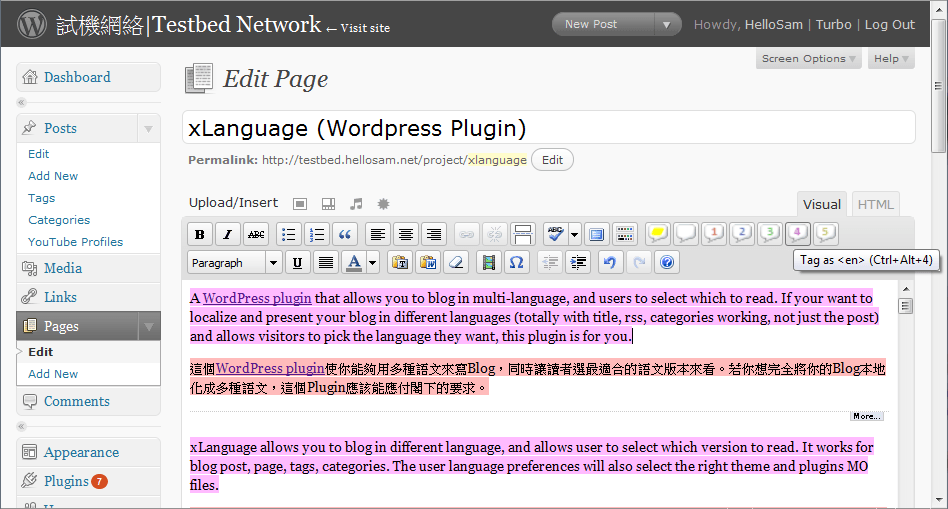
xLanguage is a full featured plugin allows you to blog in different language, and allows user to select which version to read. It works for blog post, page, tags, categories. The user language preferences will also select the right theme and plugins MO files. xLanguage
If your want to present your blog in different languages (totally with title, RSS, categories working, not just the post) and allows visitors to pick the language they want, this plugin is for you.
WPML is a WordPress plugin that can turn WordPress and WordPressMU into complete multilingual content management systems.
WPML Wordpess Plugin
WPML can translate your contents from any language to any other language. This translation, powered by ICanLocalize, is done by professional translators, writing in their native languages.
Language Switcher WordPress Plugin
The Language Switcher WordPress plugin allows you to create a bilingual or multi-lingual blog or site, using WordPress. The way it works is that you write the content for your site in multiple languages, using special tags to tell the plugin which text goes with which language. You’ll also install “gettext” language files to translate the text generated by your theme, other plugins, and WordPress itself into your target languages. The Language Switcher plugin will then let your site viewers choose a language for viewing your site, and put all the text on the screen into the right language.
mLanguage
mLanguage
mLanguage allows you to write your blog contents in multiple Languages. The only thing you have to do is by tagging each language content. (eg. en, de or fr) The Plugin runs on this site, so you can test it, just use the menu in the upper right corner of my Sidebar. The Browser will automatic show your preferred language if available.
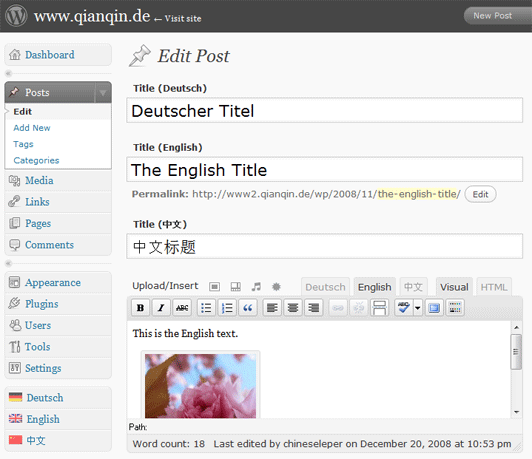
Writing multilingual content is already hard enough, why make the plugin even more complicated? I created qTranslate to let WordPress have an easy to use interface for managing a multilingual web site.
qTranslate makes creation of multilingual content as easy as working with a single language.
WP Multi Language Changer is a plugin for multi language WordPress blogs. This plugin allows you to write posts and pages in more than one language, all you have to do is to add some divs to your posts, each div with a class, that is the language’s name. This way your readers will be able to just click in the flags and change between languages.
Babel is a multilangue WordPress plugin, it will allow you to write easily your contents in more than a language.
By the latest version you will be able to localize also post titles and your blog layouts too.
It’s very easy to install it, you have only to inflate the zip and then upload it to your plugin dir and then activate the plugin.
You have only to edit you template in order to add the function babelize(), this function will show some icons that will permit you to switch between different languages.
Other interesting feature are the language splitting support, that will allow you to mix contents in more than a language in the post (eg. i start writing in ita, than ‘ll switch to eng, and then turn back to ita again).
Final
I’d like to get some feedback in case you have used or are still using one of them. I am currently also reading through the forums to check what problems others ran into with them. If I can’t make up my mind, I might give them all a try and post again here afterwards.
Have you used any of these plugins? Have something to add to the above review? Leave a comment below!
By default, WordPress compresses your images for better performance when you upload them to the…
25 responses to “Building A MultiLanguage WordPress Website”
hi. I’m using after i’ve read this post qTranslate plug in to translate my post from Romanian to English, and i have a huge problem. The default language is Romanian and the second is English, but when i use page break, the full content of English post doesn’t load (it’s said “that content doesn’t exist) i don’t know why. if i view the full content of post in Romanian, and then switch to English the content display correct. Can you help me?
Sorry, I am not the author of qTranslate. You can send your question to the homepage of that plugins.
A fantastic read….very literate and informative. Many thanks….what theme is this you are using and also, where is your RSS button ?
You can subscribe my rss by button at the top sidebar, you’re welcome
THANK YOU Narga for your great and interesting article !
Like you I am testing these plugins and found qtranslate very easy to use. WPML can do much more but I found it far too complex for a quick and simple usage.
I really would prefer to use qTranslate but it seems that Qian Qin the talented guy behind qTranslate is very busy with his studies and can only spend very limited time for the support. His forum has lots of posts asking for help and got NO answers 🙁
It’s a pity as in my opinion qTranslate is much more user friendly…
Thanks for the post.
I downloaded WPML.org’s plugin.
Hope it works well 🙂
Great and useful article!
Just downloaded WPML and it’s very user friendly.
lovely reading thanks a lot for the effort
i am building a website and i am new in the field of web development and i need to add multiple languages in fact i need two only arabic and english but i find some difficulties to use the plugins if you can help
thanks a lot
regards
This is a great strategy to build full multi-languages website with WP. It will help me exactly. Thanks.
Thank you for compiling this info.
I’ll try WPML and if it don’t work well, I’ll try the others. I had just installed xLanguage. It works fine, but there is absolutely no support. the website from the author is down, and there are no answers in the WP-forum….
I don’t feel good using a plugin without support… if something happens, you’r on your on… not good.
Thank you very much!
Olmo
is any plugin that keep translation in custom fields? thanks
The homepage is cluttered and full of junk that is not relevant to the search terms which brought up your website. There is a stupid little box on the left hand side that I cannot close which is in “always ontop” mode. Do some work on your own website before suggesting to others how they might mange thier website. Good luck…
Thanks, my hosting services had malwares and it’s cleared but the Google isn’t updates.
I’ve fix some conflict source codes. I’m too busy this time, so I can’t update this website
Great article, thanks. You mention that you have 3 favorites, but you don’t say what they are? What are your top recommendations?
Hi, Narga excellent info on making multiligual website with wordpress , after reading this article i am tring with WPML and Indic IME (on my own reasearch) plugin for indian language but unfortunately both having not working.Please tell how to solve this problem is it browser problem?
I guest your problem is character encoding. I don’t know about Indic IME too much so I can’t give you a good advise. I recommend you contact with the plugin’s author or searching on their own support area to resolve your problem.
Hope it works in future
Great info and very well informed. I am think about doing a Thai WordPress install and that should allow me to write both in Thai and English language. Those plugins are great and I may try one later on.
I believe what you typed made a lot of sense. However, what about
this? suppose you wrote a catchier post title?
I am not saying your information isn’t good., however what if you added a post title to possibly grab a person’s attention?
I mean Build full multi-languages website with WordPress | Narga is kinda vanilla.
You should peek at Yahoo’s front page and see how they create article headlines to get viewers to open the links. You might add a related video or a pic or two to grab readers excited about everything’ve written.
In my opinion, it would bring your website a little
bit more interesting.
Thanks for your recommend, I will working about the headline since next post
[…] module uses Google Translate automatic translation service to translate your web page with Google power. With 58 available languages your site will be […]
[…] what multilingual support is, why it is essential for a business that operates internationally, and how you can […]
We use cookies to improve your experience. By continuing, you agree to our use of cookies.





hi. I’m using after i’ve read this post qTranslate plug in to translate my post from Romanian to English, and i have a huge problem. The default language is Romanian and the second is English, but when i use page break, the full content of English post doesn’t load (it’s said “that content doesn’t exist) i don’t know why. if i view the full content of post in Romanian, and then switch to English the content display correct. Can you help me?
Sorry, I am not the author of qTranslate. You can send your question to the homepage of that plugins.
A fantastic read….very literate and informative. Many thanks….what theme is this you are using and also, where is your RSS button ?
You can subscribe my rss by button at the top sidebar, you’re welcome
THANK YOU Narga for your great and interesting article !
Like you I am testing these plugins and found qtranslate very easy to use. WPML can do much more but I found it far too complex for a quick and simple usage.
I really would prefer to use qTranslate but it seems that Qian Qin the talented guy behind qTranslate is very busy with his studies and can only spend very limited time for the support. His forum has lots of posts asking for help and got NO answers 🙁
It’s a pity as in my opinion qTranslate is much more user friendly…
Thanks for the post.
I downloaded WPML.org’s plugin.
Hope it works well 🙂
Great and useful article!
Just downloaded WPML and it’s very user friendly.
Thank you!
Thanks For Sharing Nice info
Check out http://wordpress.org/extend/plugins/gtranslate/
lovely reading thanks a lot for the effort
i am building a website and i am new in the field of web development and i need to add multiple languages in fact i need two only arabic and english but i find some difficulties to use the plugins if you can help
thanks a lot
regards
This is a great strategy to build full multi-languages website with WP. It will help me exactly. Thanks.
Thank you for compiling this info.
I’ll try WPML and if it don’t work well, I’ll try the others. I had just installed xLanguage. It works fine, but there is absolutely no support. the website from the author is down, and there are no answers in the WP-forum….
I don’t feel good using a plugin without support… if something happens, you’r on your on… not good.
Thank you very much!
Olmo
is any plugin that keep translation in custom fields? thanks
The homepage is cluttered and full of junk that is not relevant to the search terms which brought up your website. There is a stupid little box on the left hand side that I cannot close which is in “always ontop” mode. Do some work on your own website before suggesting to others how they might mange thier website. Good luck…
Thanks, my hosting services had malwares and it’s cleared but the Google isn’t updates.
I’ve fix some conflict source codes. I’m too busy this time, so I can’t update this website
Actually you no need to use plugin …
You can add as widget like this.
http://www.justin.my/2012/01/how-to-add-languagetranslate-to-wordpress-without-plugin/
I guess the following one is also good:
Multisite Language Switcher
http://wordpress.org/extend/plugins/multisite-language-switcher/installation/
Thank you!
Great article, thanks. You mention that you have 3 favorites, but you don’t say what they are? What are your top recommendations?
Hi, Narga excellent info on making multiligual website with wordpress , after reading this article i am tring with WPML and Indic IME (on my own reasearch) plugin for indian language but unfortunately both having not working.Please tell how to solve this problem is it browser problem?
I guest your problem is character encoding. I don’t know about Indic IME too much so I can’t give you a good advise. I recommend you contact with the plugin’s author or searching on their own support area to resolve your problem.
Hope it works in future
Great info and very well informed. I am think about doing a Thai WordPress install and that should allow me to write both in Thai and English language. Those plugins are great and I may try one later on.
I believe what you typed made a lot of sense. However, what about
this? suppose you wrote a catchier post title?
I am not saying your information isn’t good., however what if you added a post title to possibly grab a person’s attention?
I mean Build full multi-languages website with WordPress | Narga is kinda vanilla.
You should peek at Yahoo’s front page and see how they create article headlines to get viewers to open the links. You might add a related video or a pic or two to grab readers excited about everything’ve written.
In my opinion, it would bring your website a little
bit more interesting.
Thanks for your recommend, I will working about the headline since next post
[…] module uses Google Translate automatic translation service to translate your web page with Google power. With 58 available languages your site will be […]
[…] what multilingual support is, why it is essential for a business that operates internationally, and how you can […]