
Input vs Button – Which to use?

Input vs Button – Which to use?

While working on form design, I encountered some issues when using images as submit buttons when use some browsers.
You can include images in a <button> tag, but not in an <input> tag, amoung other differences. They are very similar but the tag has a few extras that can be useful on the odd occasion.

Read more
How to Highlight Author Comments in WordPress using CSS

How to Highlight Author Comments in WordPress using CSS

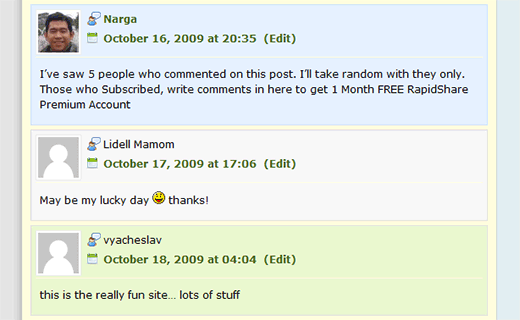
Many blogs highlight the author’s comment in the comments section. I’m talking about how to highlight comments posted by the author of the article. You can use many plugins to get this effect (For eg., the Highlight Author Comments Plugin) – but you don’t have to. Most snippets will target and try to find author’s email or user id, but that actually slows your site down. Why not using CSS selector and find author’s comment and change the background color so it is easily pointed out. Pretty smart. After that, it was a simple matter of times to see the result.

Read more
45+ Most Popular Social Bookmarking Link Codes for WordPress

45+ Most Popular Social Bookmarking Link Codes for WordPress

With Social Bookmark websites, users can save and categorize a personal collection of bookmarks and share them with others. Your visitors can now bookmark and submit your websites to all their favorite social bookmark services with the ease of a single click.
So how can we encourage more people to share our links? One of the easiest options is to include a set of links at the bottom of your posts which readers can click to automatically vote for your article. In this post, I’ve written the WordPress codes for 45+ of the most popular social bookmarking and networking sites out there.

Read more

15+ promising jQuery Lightbox-Clones plugins

Lightbox, and the newer Lightbox 2, is a JavaScript application used to display large images using modal dialogs. On a Lightbox-enabled page, a user can click an image to have it magnified in a Lightbox window, which resizes itself according to the size of the image using a gliding animation. Lightbox determines which images will be shown in the modal window through the XHTML “rel” attribute, which is used on an <a> element wrapped around the <img alt=”” /> element. Lightbox also provides a way to attach captions to images and to run a slide show, which can be navigated using the arrow keys.

Read more
How to Open All External Links in a New Window/Tabs by using jquery

How to Open All External Links in a New Window/Tabs by using jquery

If you know anything about attribute selectors, that should look familiar to you. Basically, it is saying, apply the attribute target=”_blank” to all links that begin with http. I have written a few lines of jQuery code that will convert all external links (i.e. links that begin with http) to links opening up in a new window by injecting the target=”_blank” behind the screens.

Read more
25 sexy jQuery Drop Down Multi Level Menu

25 sexy jQuery Drop Down Multi Level Menu

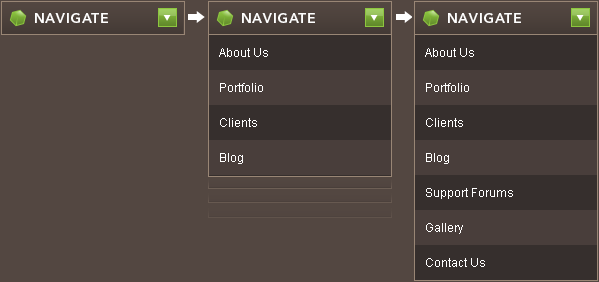
Dropdown menus and menu bars have been heavily used since the early days of graphical user interfaces. Their use has become ubiquitous, and even expected, in desktop applications, and the web has quickly followed suit. There are lots of dropdown menus already out there. Here you’ll find 25 sexy jQuery and CSS based drop-down or just multi level menu tutorials with down loadable files and explanations as well.

Read more
WordPress 2.9 Carmen With New Features Every Developer Must Know

WordPress 2.9 Carmen With New Features Every Developer Must Know

On December 18th, 2009, WordPress Version 2.9, named in honor of magical jazz vocalist Carmen McRae, was released to the public before the year ends. You can upgrade easily from your Dashboard by going to Tools > Upgrade, or you can download from WordPress.org. The WordPress 2.9 requires MySQL 4.1.2 or greater.
You can read the full list of new features, changes, upgrades, and improvements on the WordPress Codex

Read more