
Since July 29, 2011 Google announced Page Speed Service is an online service that automatically speeds up loading of your web pages. Until Aug 2012, Google only accept you using their service by invitation request but now, we can register for free by filling this form. But keep in mind, Google will eventually start to charge for the service – plus they aren’t yet disclosing how much. Google does promise the “pricing will be competitive” and they will give you 30 days to decide once they announce the pricing. There’s no rumor on how long this free trial blessing from Google will last.
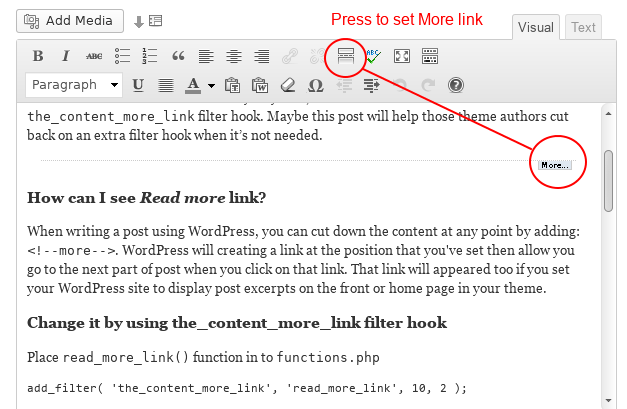
3 Easy ways to customize the WordPress Read More link/text
Sometimes, when you crafting your themes, you will need to change the WordPress Read more link/text of the post loop that appeared on the homepage like See more…, View more … … and somethings similar. The easiest way to do it by direct change it through index.php or in the loop function: the_content('Read on...');
You don’t want to do like it – the dirty way. Yes, I’m too!. Since WordPress v2.8 introduced the_content_more_link filter hook. Maybe this post will help those theme authors cut back on an extra filter hook when it’s not needed.
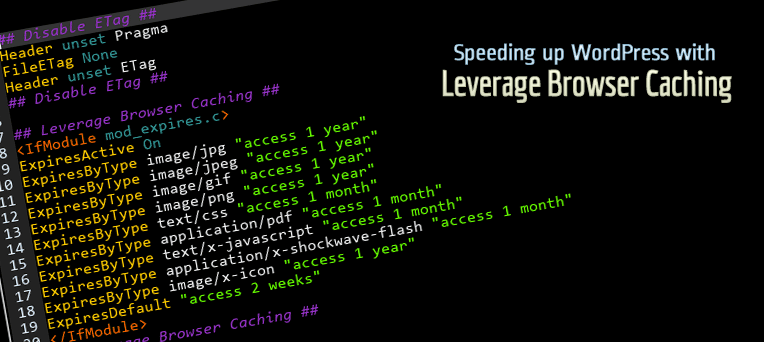
Speeding up WordPress with Leverage Browser Caching
Site speed and page load times are now an important component of the Google ranking algorithm, which can affect search engine rankings of your site. If you have tested your webpage for speed by using Google PageSpeed and found out that you need to use browser caching, here is how you do it.
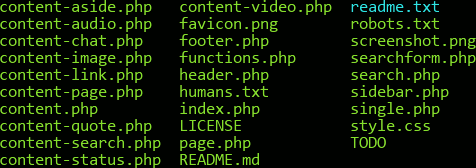
Re-Use Common Elements with WordPress Template Part
During WordPress theme development process, you’ll repeat using some part of your layout like header, sidebar, footer, content body… WordPress has a few standard includes built in, such as get_header(), get_footer(), and get_sidebar(). However, since WordPress 3+ you can easily create your own custom includes using the get_template_part() function.
By using WordPress Template Part, your theme is more compact and we can now have libraries of reusable template code, we can package additional sidebars, slide shows, social icons, custom loops, search boxes, logon boxes etc … and call these in any of our theme pages.
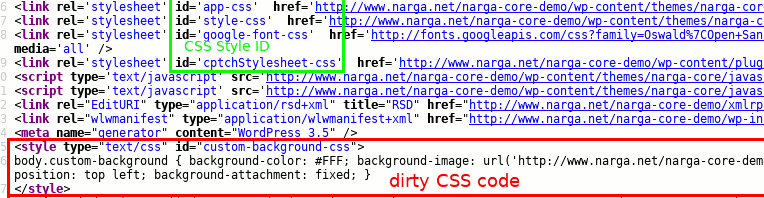
WordPress Child Theme: remove and load more scripts and styles files
During the development process of WordPress Child Theme you will planning remove some default scripts and styles or change the way to tell browser load them, then add your own to optimize the theme. This, of course, you should try to make as little HTTP requests as possible to keep your site up to speed, put your JavaScript in the bottom of the page to ensure faster rendering, and it also gets real tough to maintain all those separate files if many things have to change The good news is that WordPress has a built-in system that allows us to deregister these scripts and styles instead edit the parent theme files.
A Guide to Creating WordPress Child Theme
The most interesting feature of WordPress which I like is Child Theme. A WordPress child theme is a theme that inherits the functionality of another theme, called the parent theme, and allows you to modify, or add to, the functionality of that parent theme without having to edit the original/parent theme template files. Since the child theme is stored separately, you don’t need to redo the changes next time you upgrade the theme. For this reason, child themes are the recommended way of making modifications to a theme.
Child themes let you start with the basics of an existing theme, so you’re not having to reinvent the wheel. You can pick a theme that has the functionality and basic layout you need, but then customize everything about it as you would designing a theme from scratch. So, choose a good WordPress original/parent theme is very important. I recommend that you choose a WordPress Theme Framework.
Build Your Own WordPress Development Environment
Since moved to WordPress, I always made my own theme yearly. Like another WordPress Themes Developer, I created my own developing enviroment to custom WordPress design and development. If you want to become a freelance WordPress Themes Developer or just make your own WordPress theme like me, this topic will list the things you need before you start.
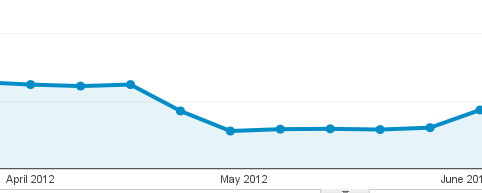
Fighting against Google Penguins and Pandas
Do you know I’m running some websites without making SEO daily or weekly. I just used a little SEO tweaks in the process of layout design. I never had an issue with Google Search and the page views and visitor increase day by day until one dreaded day. Google Search has updated with Penguin and Panda then my website fall down, one of them was almost disappeared on Google Search Results. Here’s my story, full of panic, with a lot of failed attempts to “fix” the site and a “recovery” from ugliness creatures on the internet.

25+ Useful jQuery Plugins for Working With Social Media
Due to growing popularity of social networking sites every body wants to grow their site traffic through these social sites like Facebook, Twitter, Digg, Dzone etc… Every business whether small or big is doing its best to spread a word about its activities through Social Media. They help the websites and bloggers to generate new and high traffic by telling people that how many other people like this website and blogs. This is the reason the integration of Social Media into websites has become more essential now.
jQuery offers various solutions in form of plugins and widgets that are really helpful. You can choose a tool that can appropriately meet your social media promotional needs but finding them may not be easy as it seems.

Understanding Font sizing in CSS: em – px – pt – percent – rem
In CSS3, you’re found sixteen (Yes, sixteen!) different units by which you can measure the size of text with font-size attribute. Some have their history in typography, such as point (pt) and pica (pc), others are known from everyday use, such as centimeter (cm) and inch (in). Some units are very popular but there are rare units or don’t use in website development. In this topic, I’m telling you about the summary of these attributes which is best suited for your website.
Useful WordPress Tweaks & Plugins to Hardening Your WordPress
Have you ever asked yourself about your WordPress website’s security? How to keep your WordPress websites away from the bad guys for good? Lots of bloggers and website administrators fail to recognize the importance of securing their site.
From a few months ago, my website has hacked with a trojan, their made a backdoor then change .htaccess file to changed almost information about my website on Google search result to spam information.
After all this, I came to WordPress plugins website and had a look to some security plugins. If they were working fine then it’s can make my blog more secure from these type of attacks.