How to Disable Image Compression in WordPress
By default, WordPress compresses your images for better performance when you upload them to the media library. Here’s how you can Disable Image Compression in WordPress or change it.

By default, WordPress compresses your images for better performance when you upload them to the media library. Here’s how you can Disable Image Compression in WordPress or change it.

In most cases, this simply adds unnecessary load to your site, lower your website speed and wast the server power. So in this tutorial, I am going to explain how to remove jQuery-Migrate from WordPress.
Here are a few common and silly mistakes which web developers tend to make with WordPress, which they regret later on.

In recent years, Retina or HiDPI Display has been one of the most discussed topics among web designers and developers. With more and more high resolution devices are being introduced…
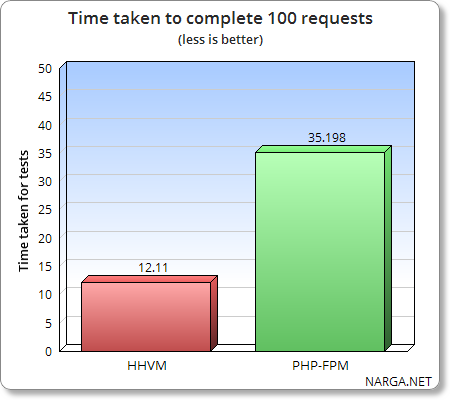
Improve WordPress and Server (LEMP) performance by switch to HHVM from PHP-FPM.

Do you know? Google is cracking down on mobile-unfriendly sites. If your site isn’t optimized for mobile, you’re losing a whole chunk of users on the go who will quickly look elsewhere if your site does’t load on their device. Here’re 3 fantastic plugins that will automatically optimize your WordPress site for all types of mobile devices.
This quick guide will take you start WordPress Blog in 10 Minutes for Beginner Bloggers
Trust me, it’s hard to store and manage large amounts of data. There are most effective tips to reduce the size of WordPress installation. It very easy and simple to make WordPress site faster.